An AI finance chatbot that earns trust before it asks
A financial AI that proves its value before asking what’s in your bank account.
Qualitative research, concept design, usability testing
2 months
Isabelle Tang
Tyler Jan
Sky
My impact
My research shaped a response template and four entry-point flows. The template and prototype passed the product team’s design review, showing how stored context could lead to an explained recommendation and a practical monthly budget.
Overview
Made financial guidance feel safe from the very first question.
theAI.Money began as a follow-up to We FIRE, our team’s earlier financial planning platform. We FIRE gave users dashboards and manual data entry: useful, but demanding for someone with little financial experience.
The team wanted to lower that barrier. Instead of asking users to organize their finances first, theAI.Money uses AI conversation as the way in: ask a question, get guidance, no setup required.
theAI.Money
A conversational financial assistant, from the team behind We FIRE.
Beginners, 20–35
New to AI tools and new to personal finance.
Value before data
Guidance first; financial details only when they clearly improve the answer.
The solution at a glance
Four ways in, one outcome
However much the user has shared, the assistant answers first, asks only for what would change the guidance, and confirms before using anything.
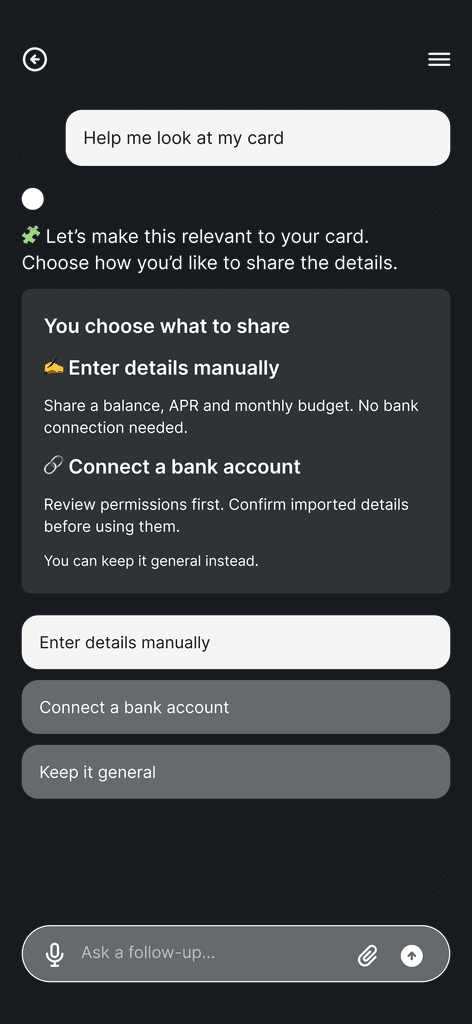 AGuest, no dataChoose how to shareEnter details or connect a bank
 BSigned in, no dataConnect only what’s neededOne card, nothing else
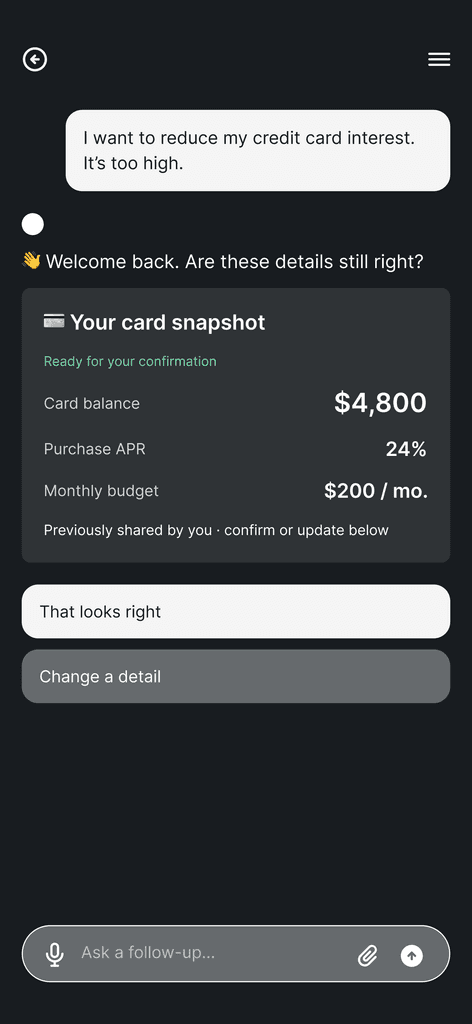 CReturningConfirm stored details“Are these still right?”
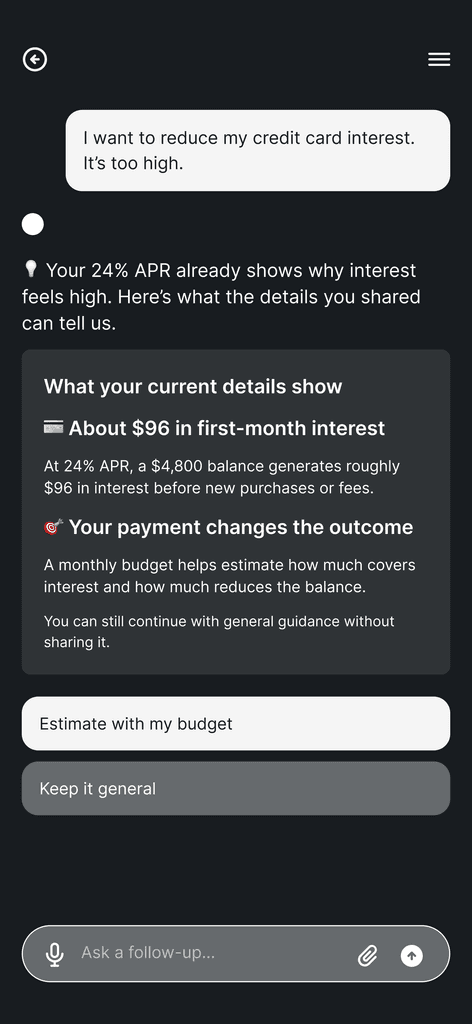 DPartial dataUse what’s knownAsk for the one missing detail
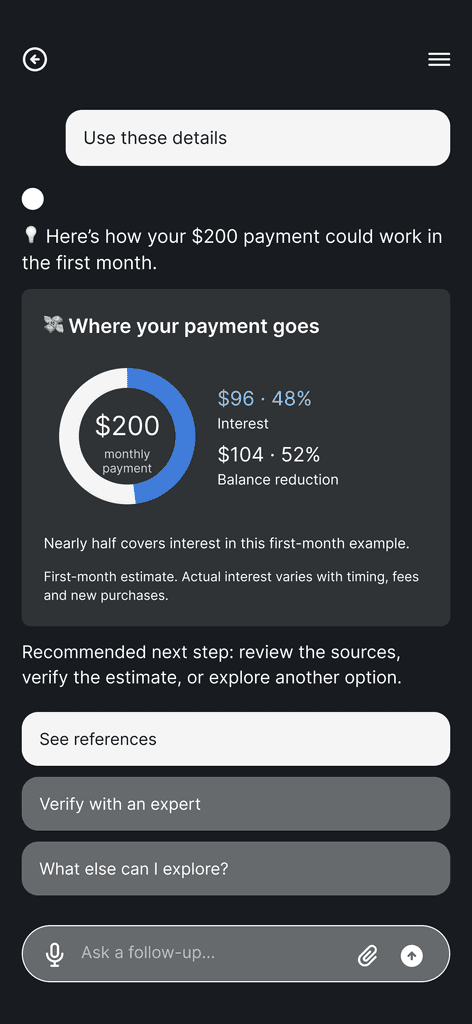
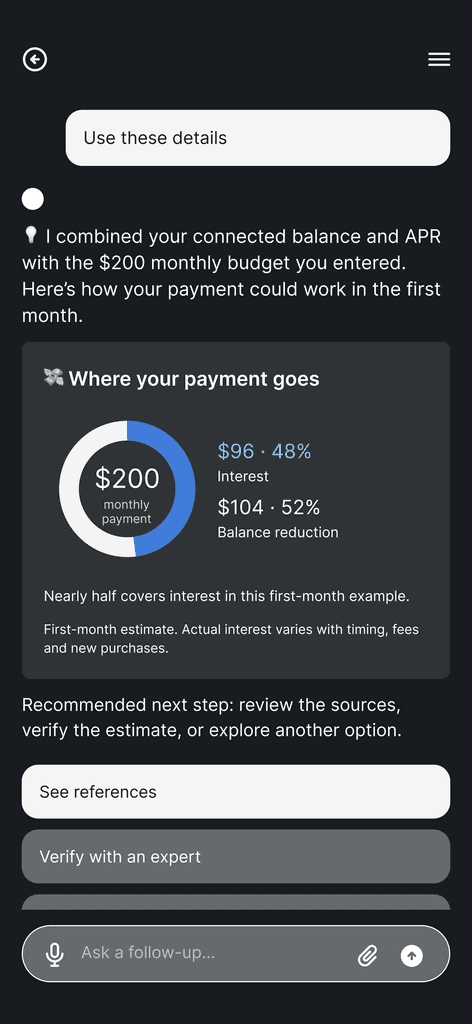
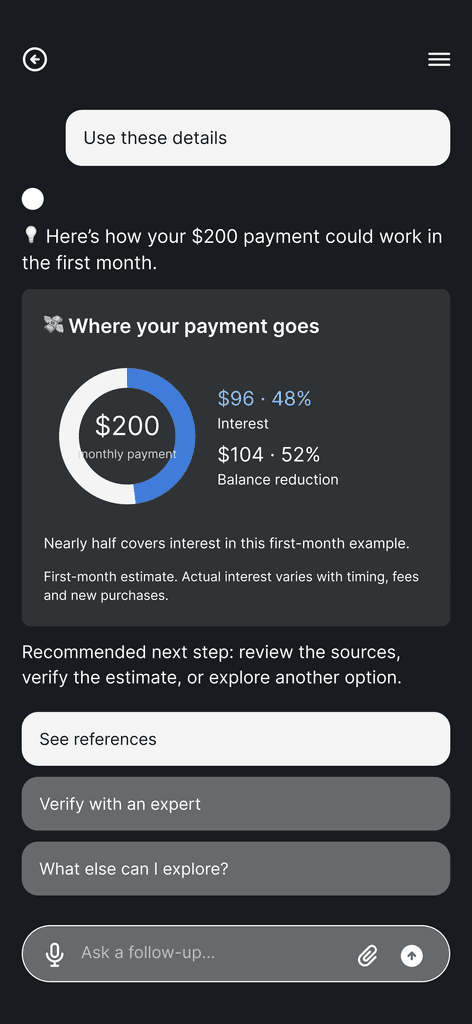
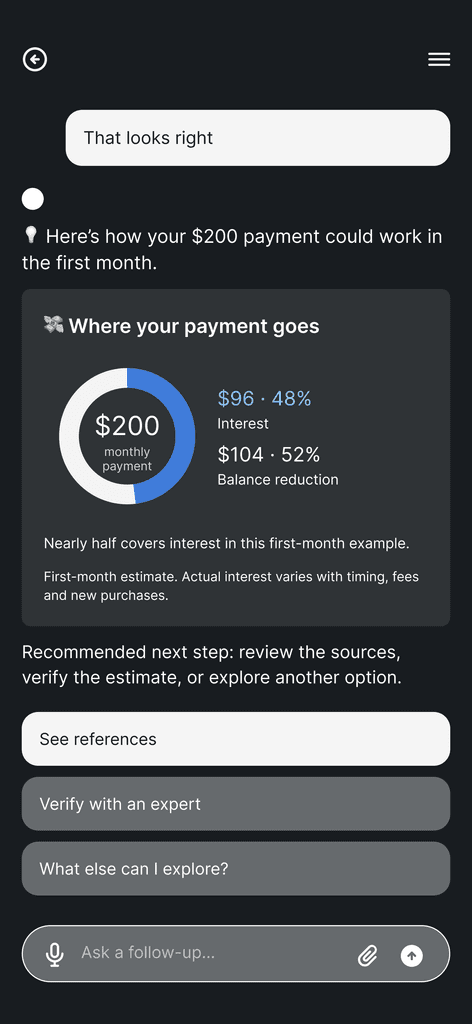 Same outcomeGuidance they can act onWhere the $200 goes, the sources, and a next step
Problem
People were already asking AI about money. They just didn’t trust it with their numbers.
By 2024 the pattern was visible. Many Americans were using AI to help manage their finances, yet far fewer trusted it as much as a human advisor. People were willing to ask AI about money, but handing over specific financial details raised real concerns about privacy and how that data might be used.
of Americans, rising to 61% among Gen Z.
and 62% of Millennials.
Most still prefer a person.
Sources: BMO Real Financial Progress Index (Ipsos, Jul 2024, n=2,501); Experian (Atomik Research, Oct 2024, n=2,011).
For the chatbot, this trust gap showed up at a critical moment: getting started. The product needed personal context to give relevant guidance, but asking for financial details too early could make users hesitate. We needed to understand what people were comfortable sharing, what they expected in return, and what would help them feel in control.
So the challenge wasn’t building smarter AI. It was making people comfortable enough to use it.
Research
Ran three research streams to learn what makes newcomers willing to share.
newcomers aged 20–35
in financial scenarios
Cleo, Kiro, Bright Money, Empower…
What we learned from the interviews
Users wanted a reason to share
They hesitated when tools asked for financial details before showing how that information would improve the guidance.
More tools still left the work to users
They pieced together banking apps, spreadsheets and memory to understand their situation.
Knowing what to do wasn’t enough to start
They knew they should budget, save or repay debt, but struggled to pick the first step.
Personalization meant relevance
They wanted guidance on their current question without explaining their entire financial situation.
User journey: where engagement breaks down
Concerned → hopeful → overwhelmed → discouraged. The drop after the first answers is where the opportunity sits.
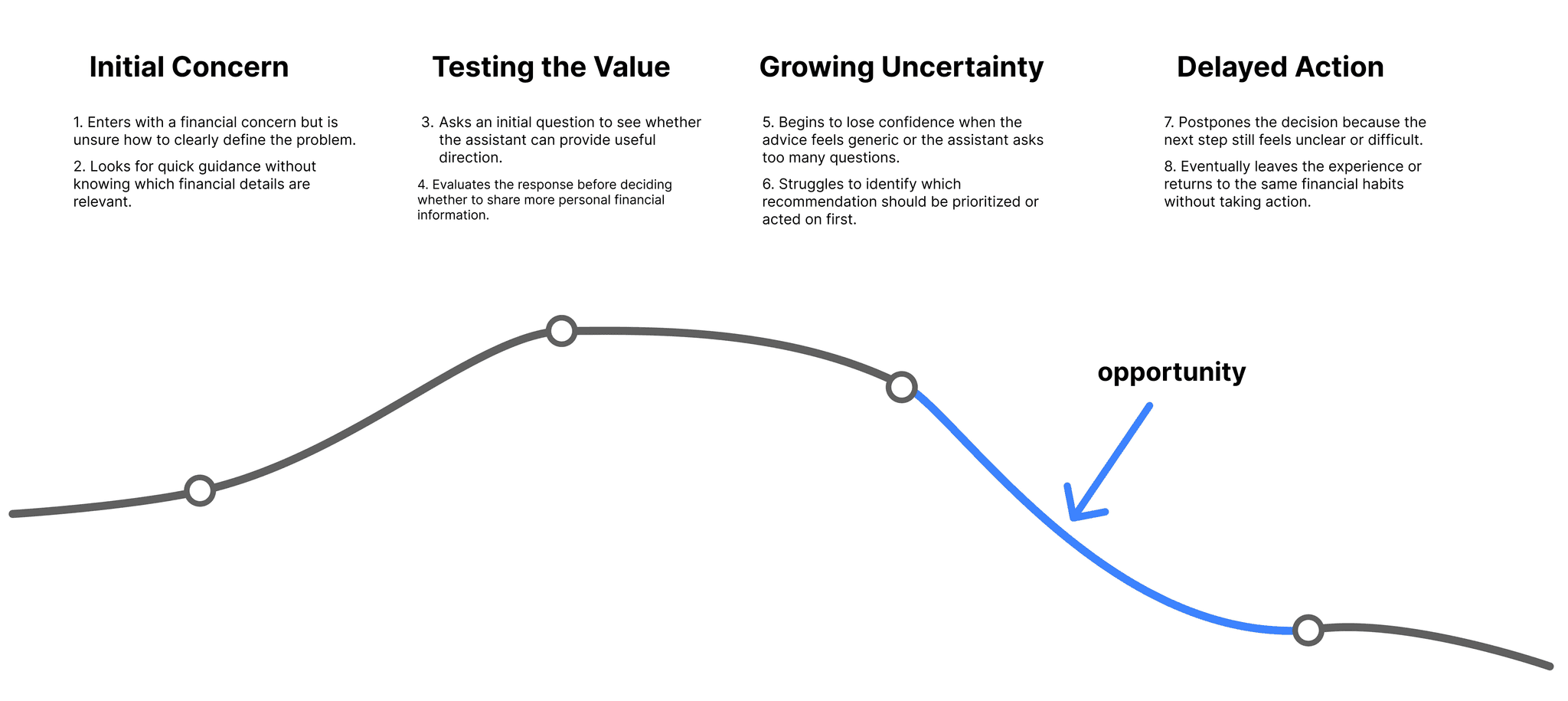
The first AI response decided whether users continued
Asking AI a financial question and sharing personal details were separate decisions. Participants wanted relevant guidance, a manageable next step, and a clear reason to provide more context. That led me to the tools themselves: how did existing assistants give initial value, request information and help users move forward?
Evaluating existing AI tools
How did existing assistants handle requests for more context?
I evaluated 12 AI tools across seven financial scenarios (51 model responses), focusing on how they used available context, requested more information, and guided users toward a next step.
What the AI-tool review showed
Three takeaways
Use the context already available
Check what the user has shared before making assumptions or asking them to repeat it.
Offer an initial answer
Give useful guidance within the limits of the context, then explain what more information could improve.
Give each follow-up a purpose
Tie extra questions to the current decision, and say why the answer matters.
From 12 responses to one template
I compared the 12 tools’ responses to the same car-loan payoff scenario, mapping how they framed the problem, used context, explained options and suggested a next step. The comparison became an ideal response template: understand the question, make the options clear, then suggest a manageable next step.
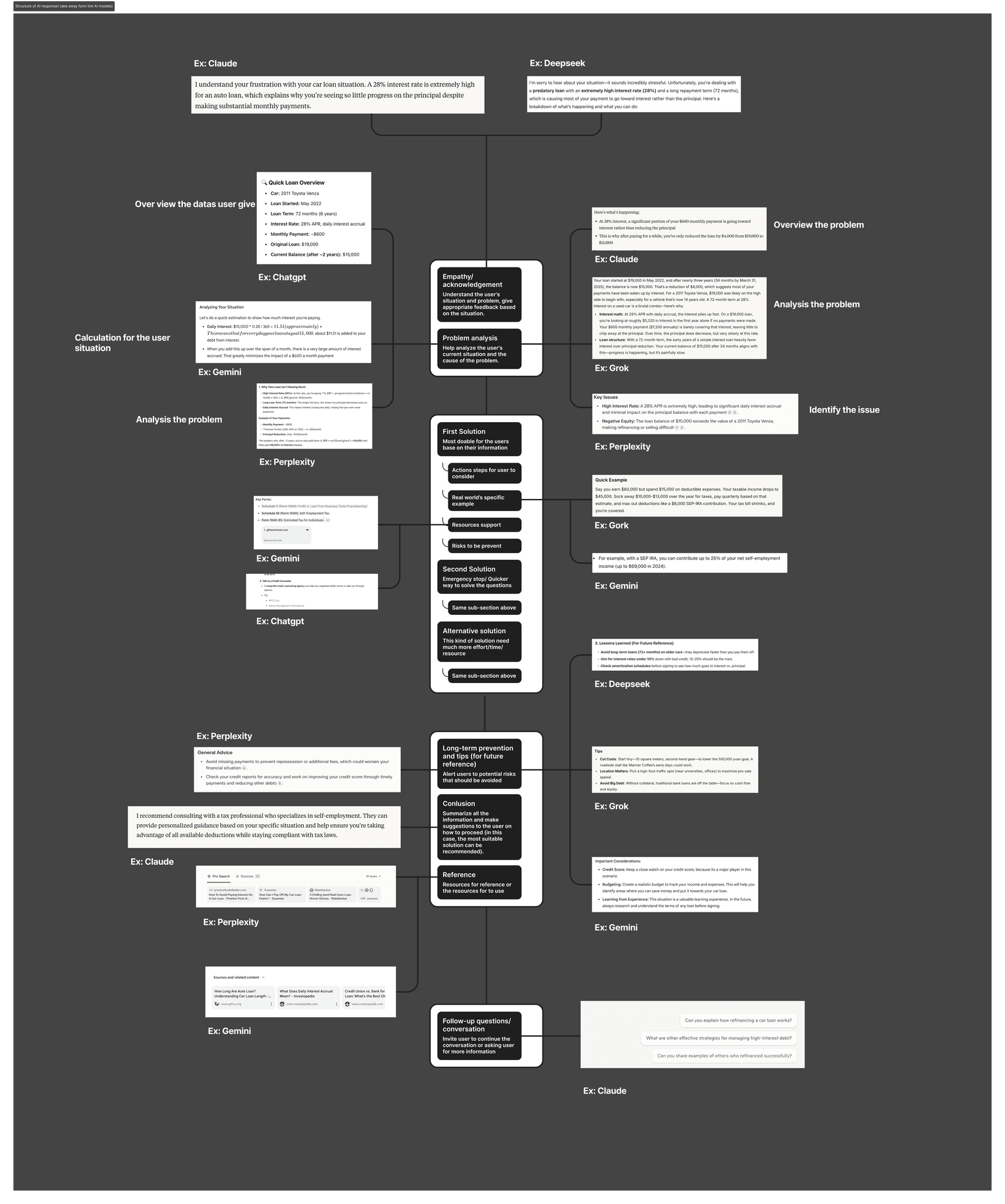
Evaluating existing finance products
Does the pattern hold beyond AI responses?
I evaluated six personal finance products against Nielsen’s 10 usability heuristics. The same trust gap appeared in products already on the market.
What the product review showed
Three implications for the design
Let users explore before connecting finance info
Make bank linking optional, and offer a way to begin without a full financial profile.
Explain the information request
Show why a detail is needed and how it supports the current task before asking for it.
Keep the conversation flexible
Let users skip setup, leave a flow, and type their own questions instead of only preset replies.
Synthesis
Found the problem wasn’t a lack of financial advice.
Financial newcomers needed a first step that felt safe enough to try, clear enough to evaluate, and concrete enough to act on.
What each research stream contributed to the design
A relevant first response and a clear reason to share more.
Guidance that uses available context and explains the next step.
Ways to explore, skip requests, and choose how to continue.
Ideation
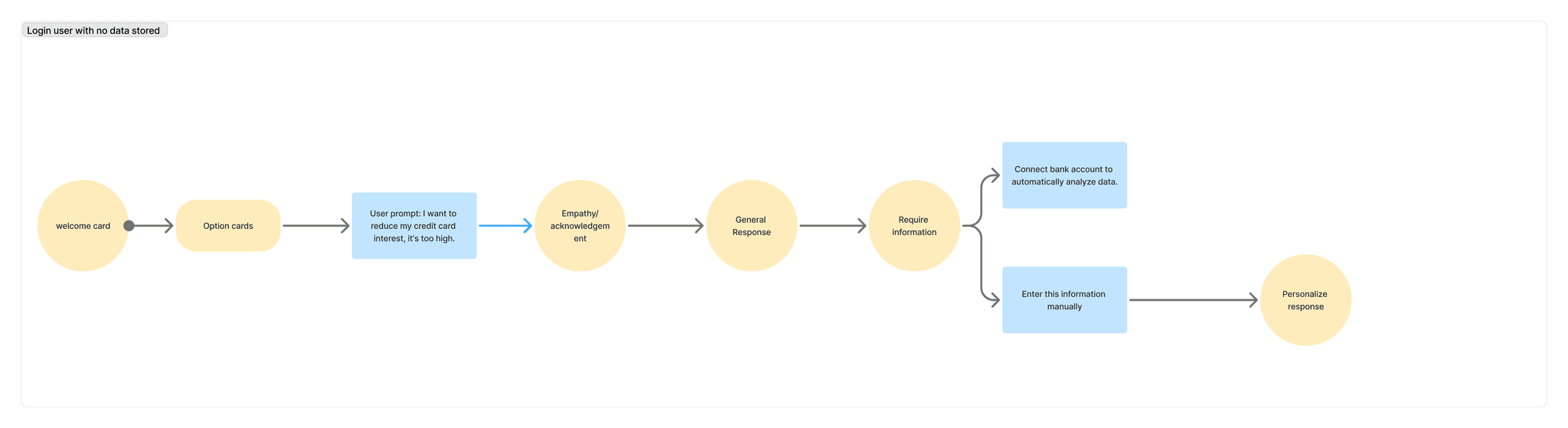
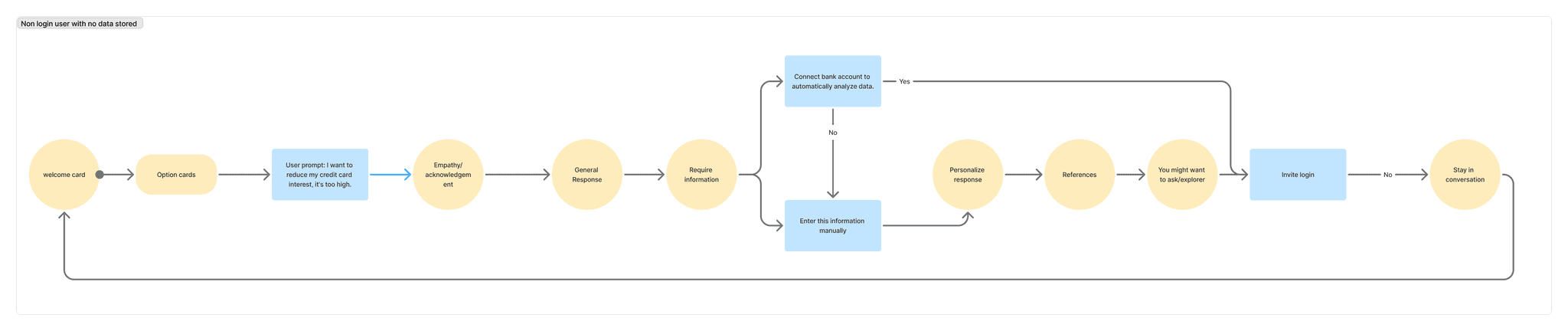
Mapped how one response template adapts to every way a user could arrive.
The interaction map covers entry, optional onboarding and four account conditions. Each path adapts the conversation to the context already available, while following the same principle: provide value first, explain every request, and leave the user in control.
Entry & optional onboardingUsers can ask a question immediately; sign-up and onboarding appear only when useful.
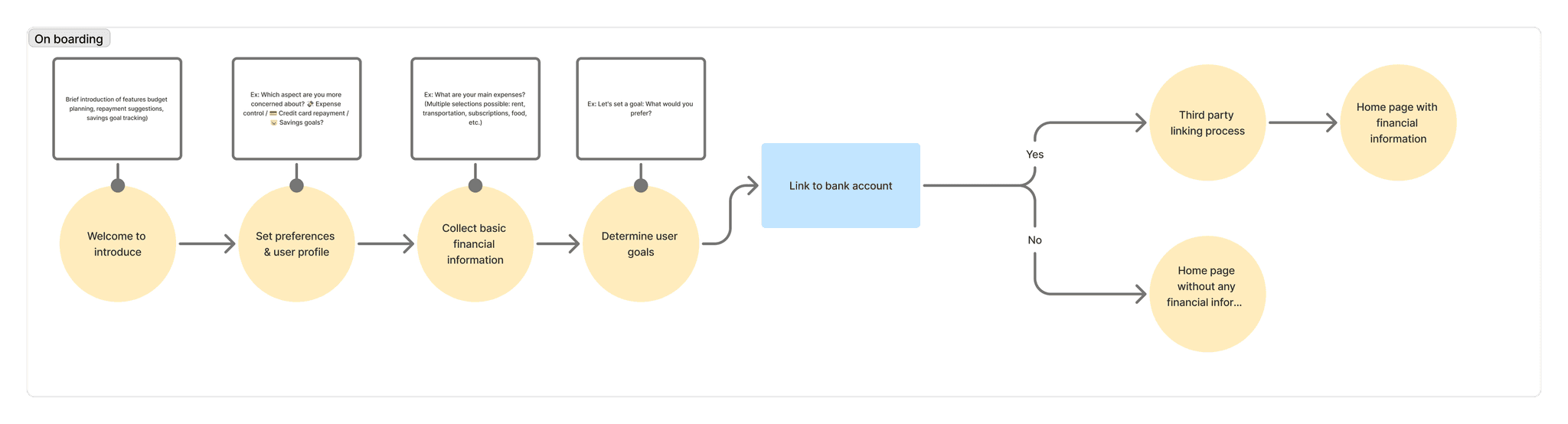
Guest · no stored dataOffers an initial answer without requiring sign-up or personal financial information.
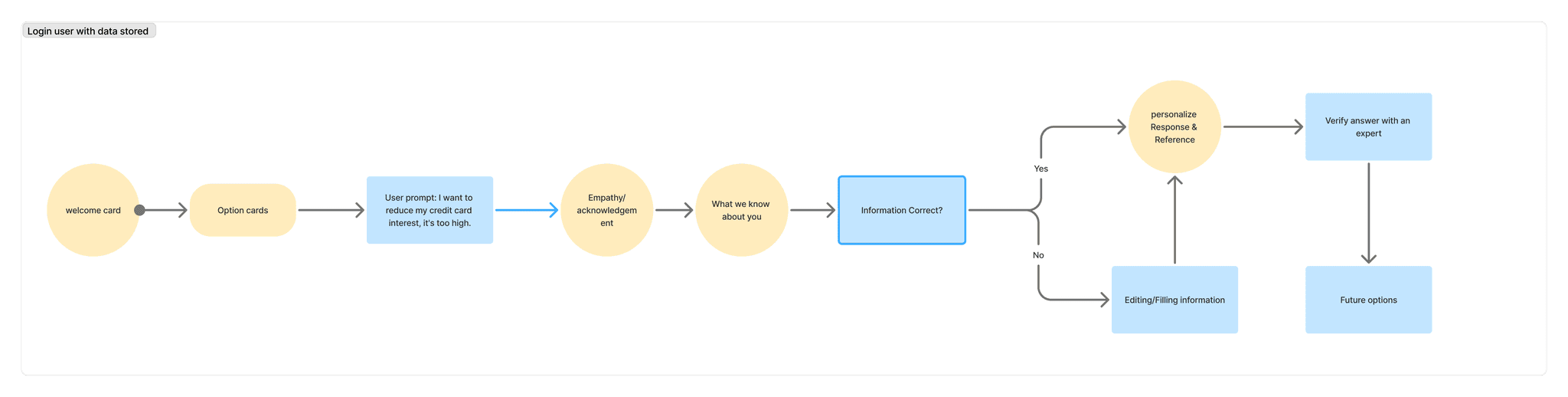
Signed in · no financial dataLets the user begin without completing a financial profile.
Signed in · partial dataUses available context and asks only for the missing information that would change the guidance.
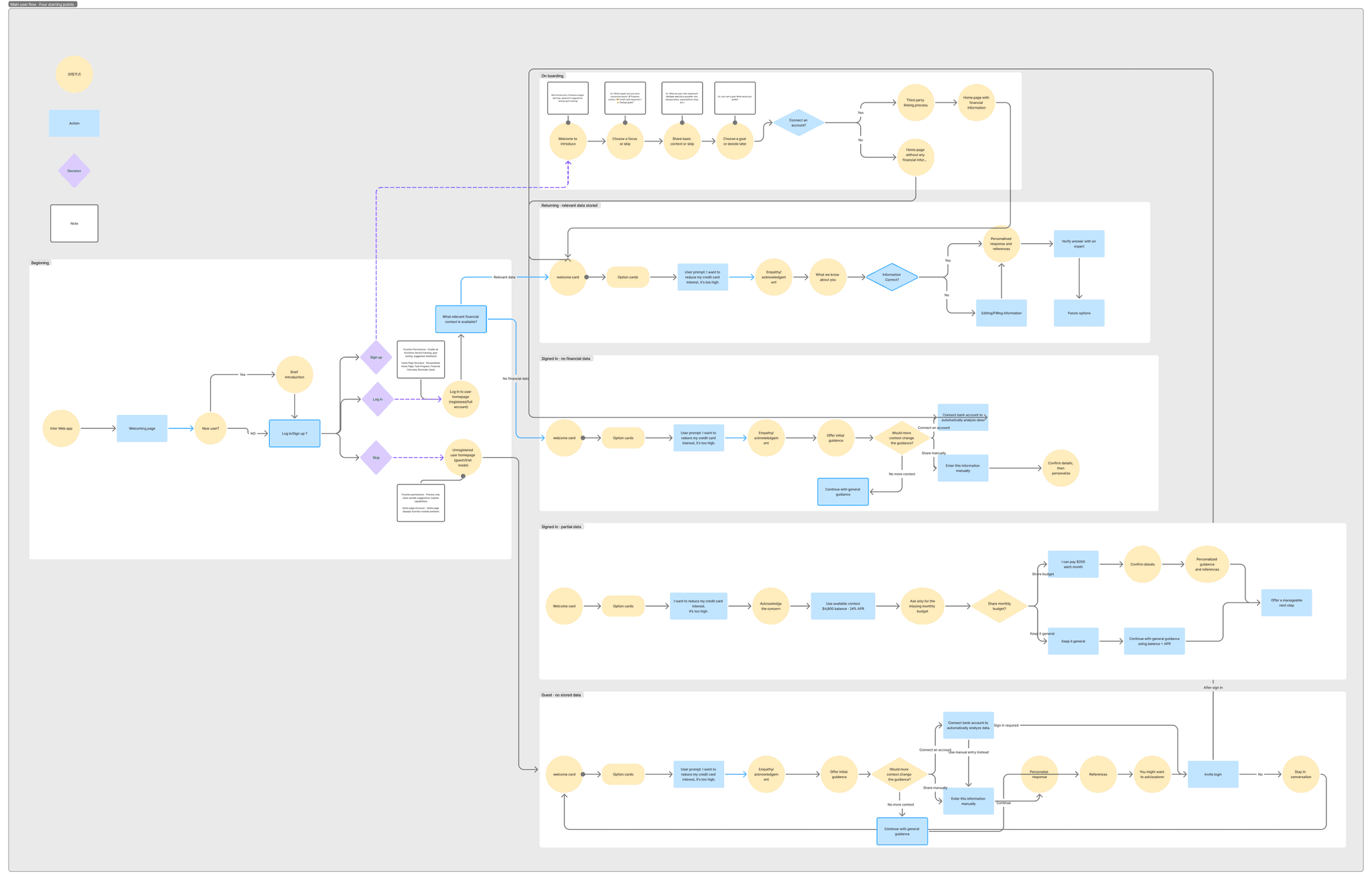
Returning · relevant data storedShows what’s already stored and asks users to confirm or update it before giving guidance. Nothing is reused without their approval.
Design
Designed four starting points that converge on one shared outcome.
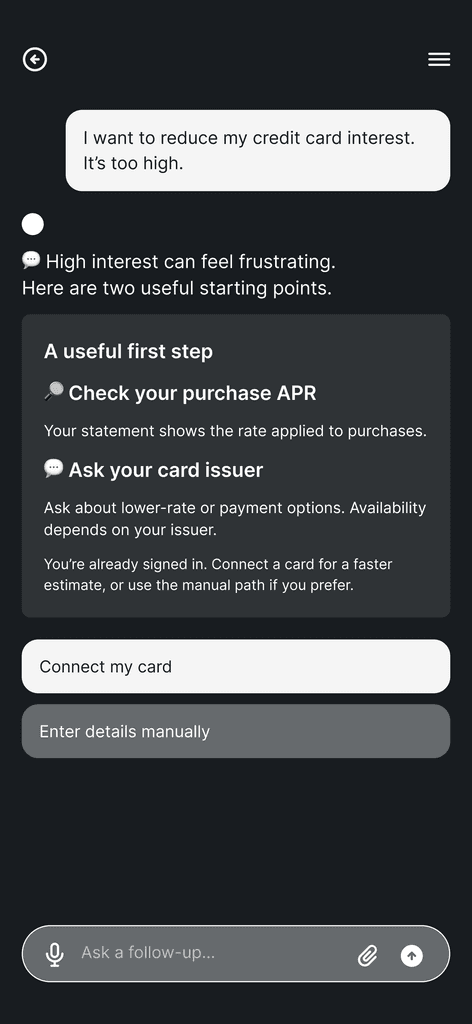
Each path collects or confirms context differently, then arrives at the same personalized guidance once the required information is available. Three decisions carry the trust-first idea across all four paths.
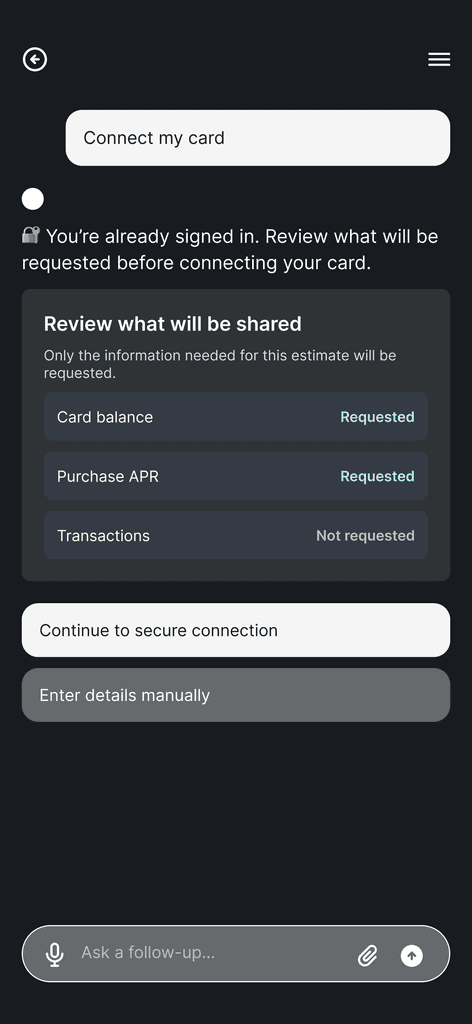
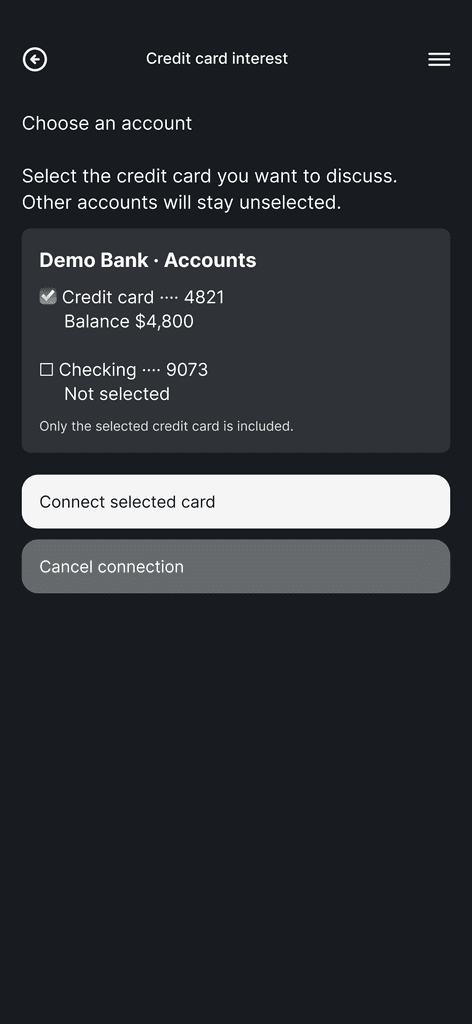
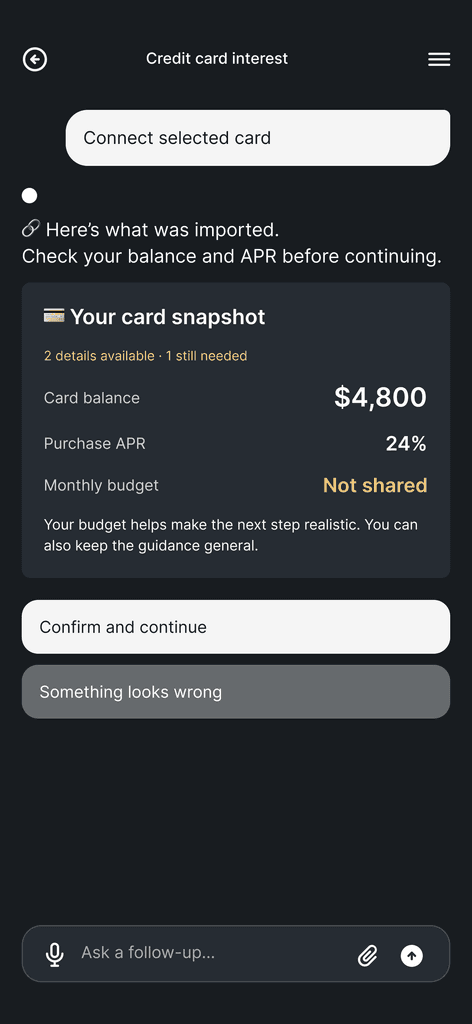
Preview what will be shared, before connecting
Before a card is connected, the assistant lists exactly what it will read. Card balance and purchase APR are marked Requested; transaction history is Not requested. Entering details by hand stays one tap away.
From researchUsers hesitated when a tool asked for financial details before showing how they would improve the guidance.
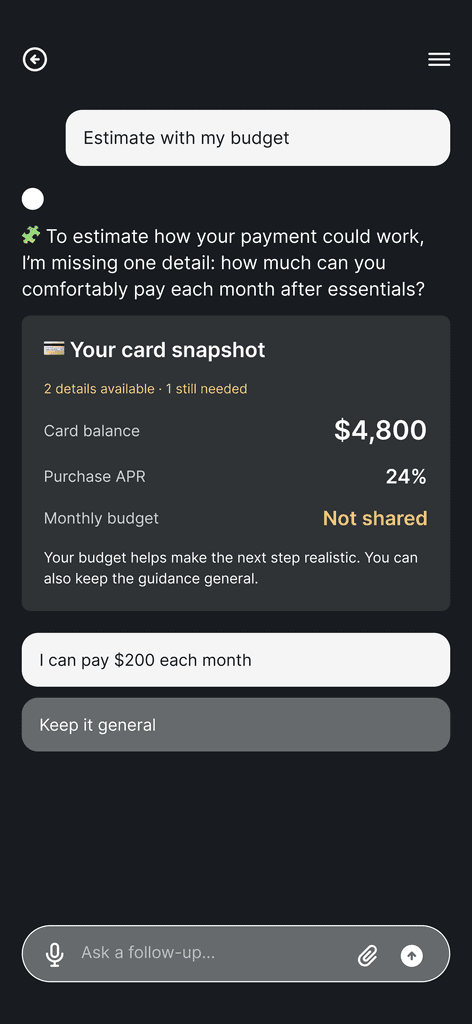
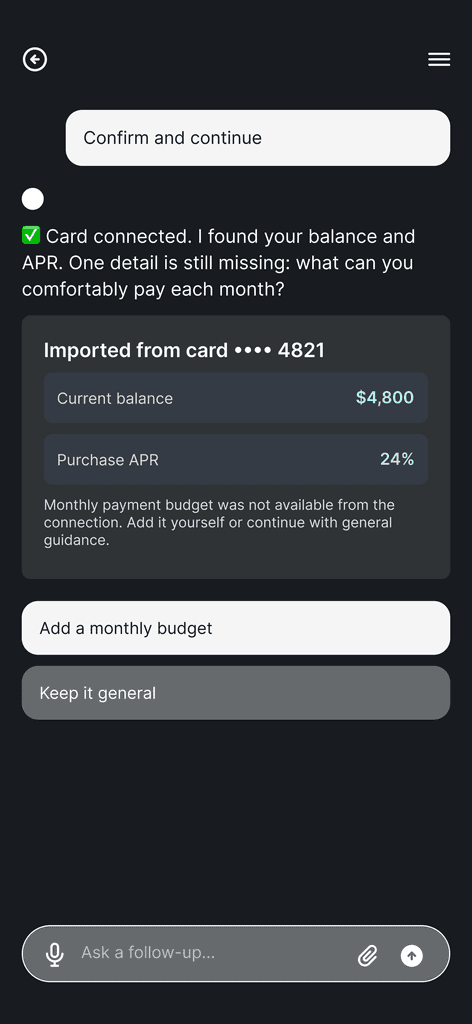
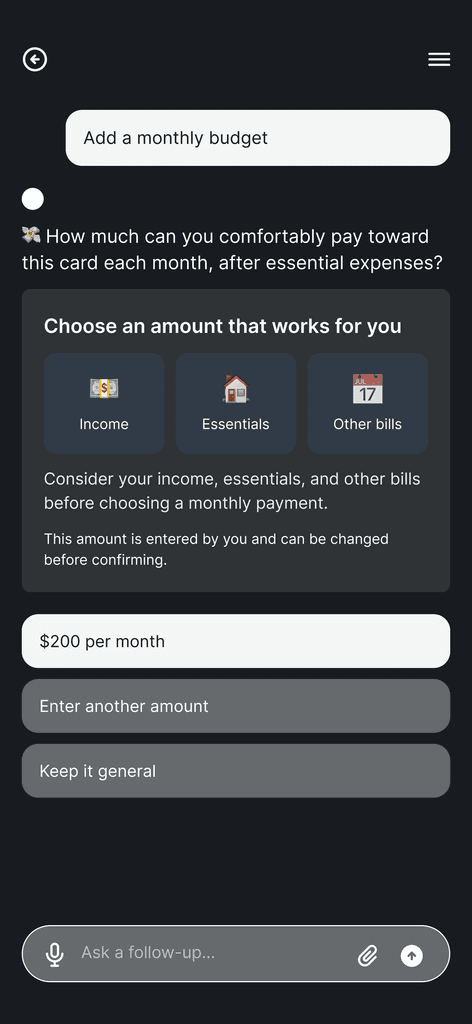
Ask only for the one detail that’s missing
Balance and APR are already known, so the assistant asks for the monthly budget alone and says what it will be used for. Keep it general is always offered, so sharing never becomes a gate.
From researchThe strongest AI responses used the context already available and gave every follow-up question a purpose.
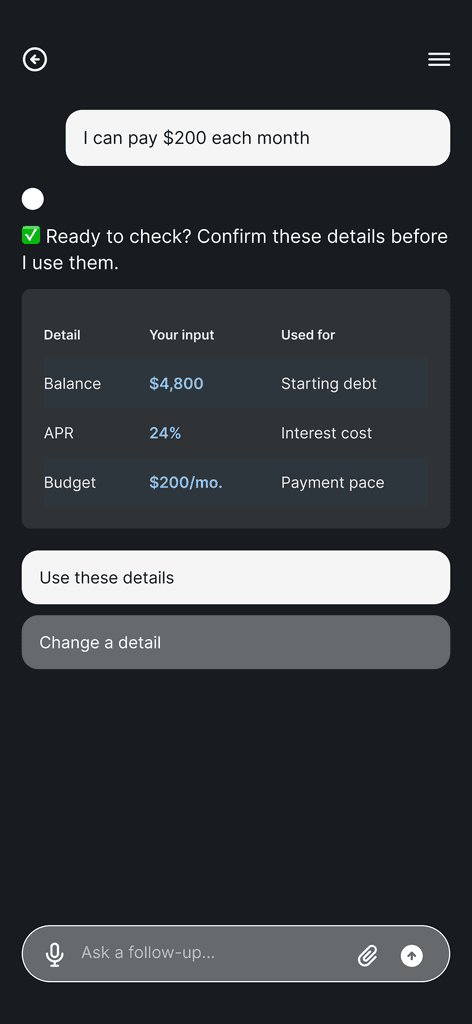
Show how each detail will be used, then confirm
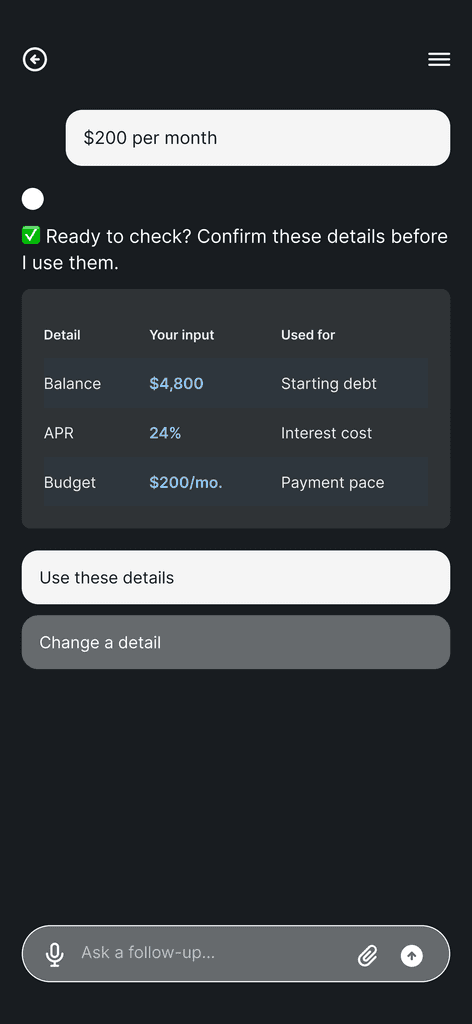
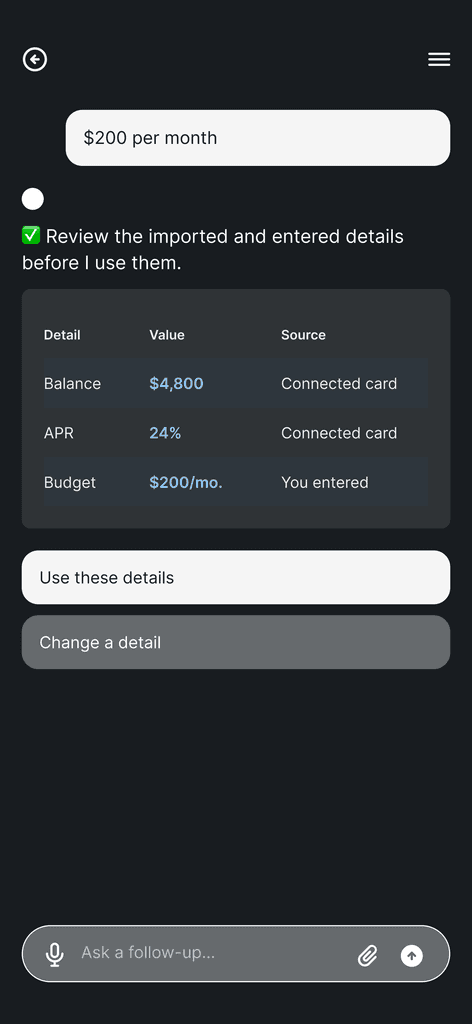
Before guidance is calculated, a table pairs every input with its purpose: balance sets the starting debt, APR the interest cost, budget the payment pace. Users confirm or change a detail. Nothing is reused without their approval.
From researchProduct reviews showed users need to see why information is requested, and stay free to change course.
All four paths, screen by screen
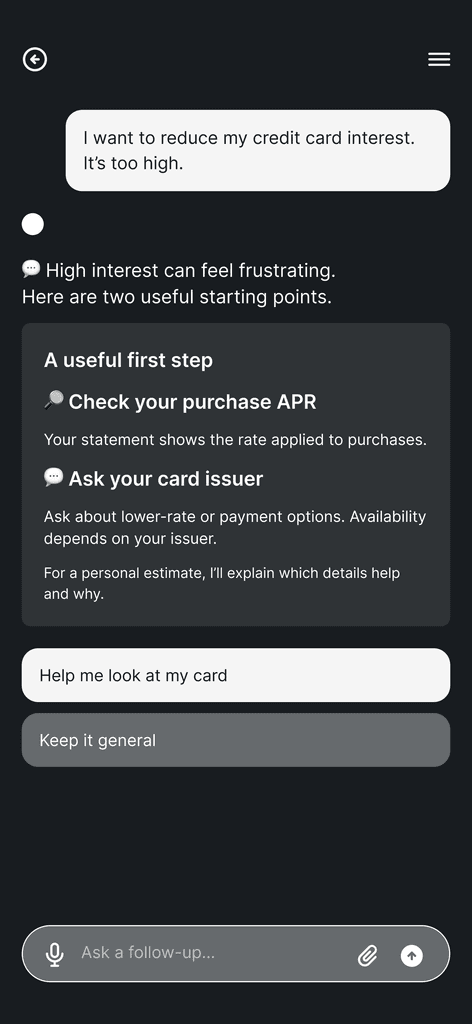
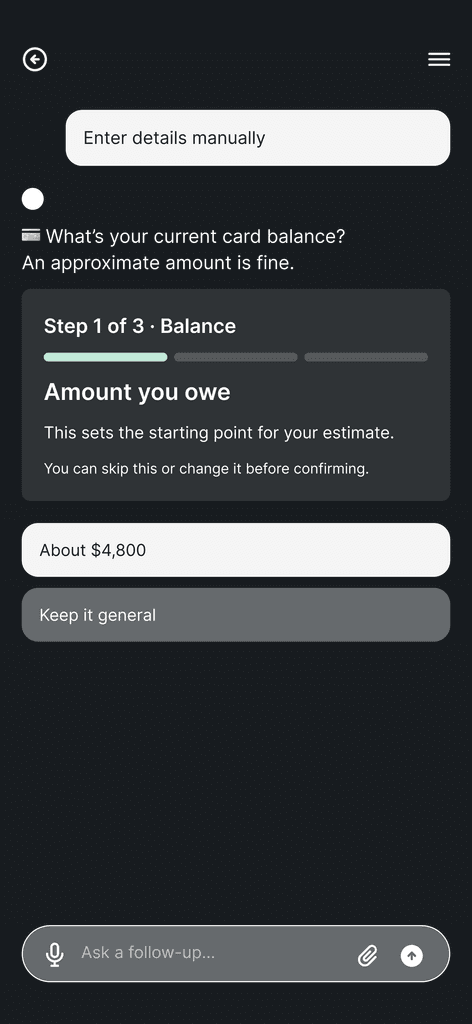
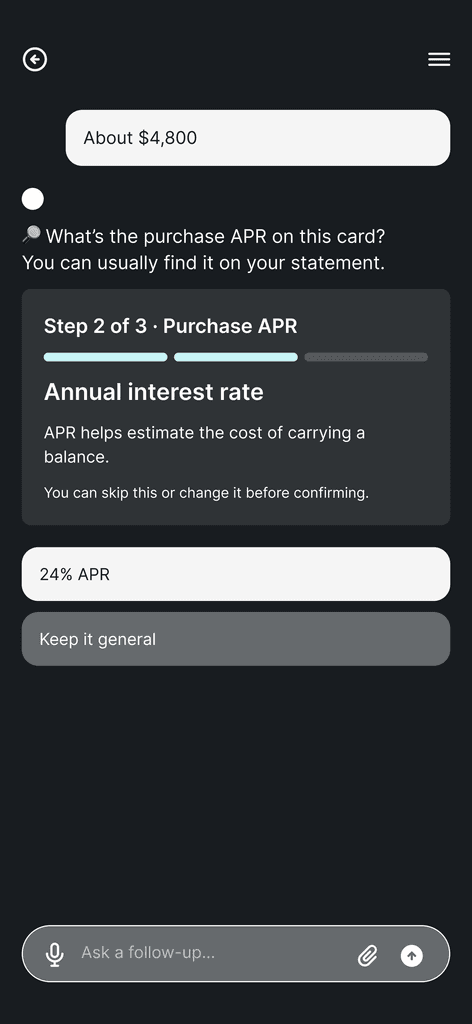
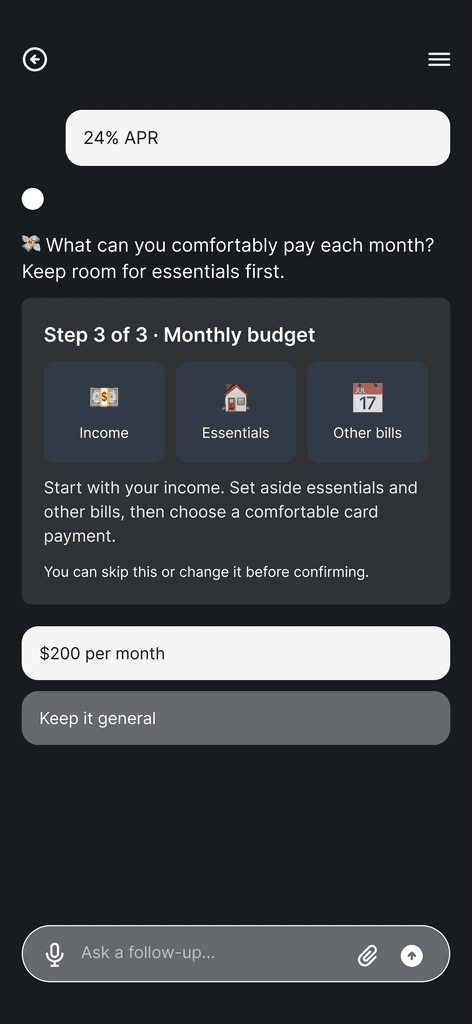
34 screens across guest, signed-in, returning and partial-data users. Click a screen to zoom.
A · Guest, no stored data
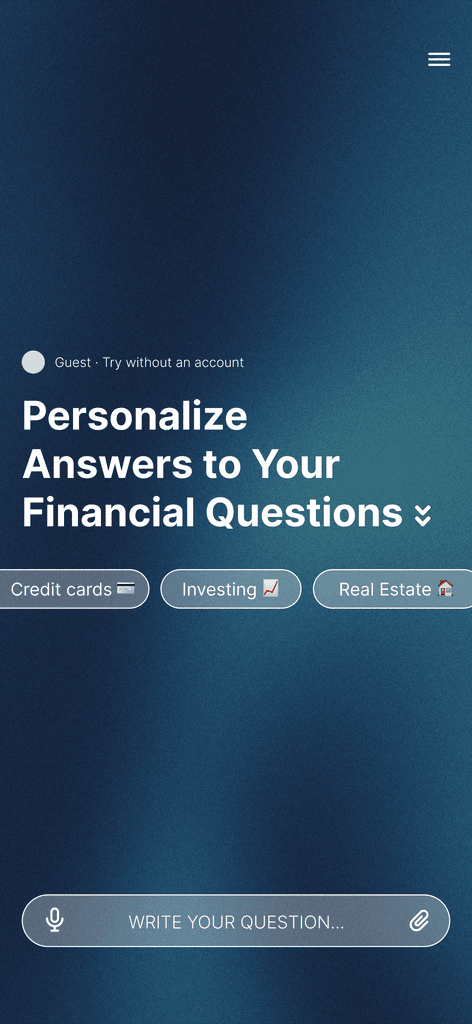
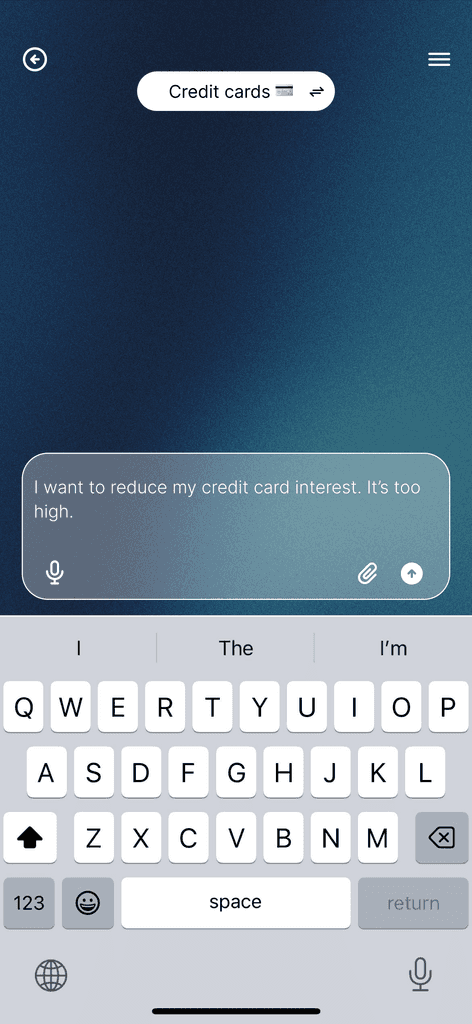
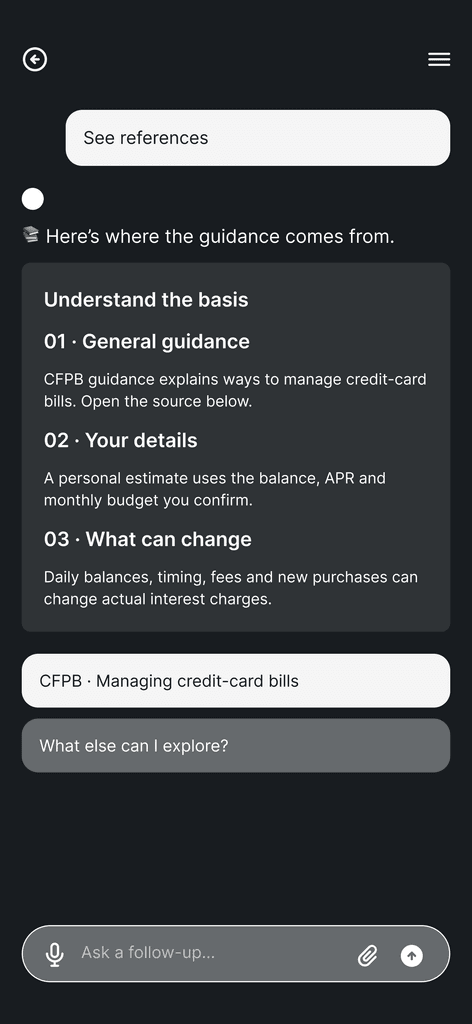
10 screensAnswer first → choose how to share → enter details step by step → confirm.
- 01
- 02
- 03
- 04
- 05
- 06
- 07
- 08
- 09
- 10
B · Signed in, no financial data
12 screensA permissions preview before connecting: balance and APR “Requested”, transaction history “Not requested”.
- 01
- 02
- 03
- 04
- 05
- 06
- 07
- 08
- 09
- 10
- 11
- 12
C · Returning, data stored
5 screens“Welcome back. Are these details still right?” Confirm, then receive guidance.
- 01
- 02
- 03
- 04
- 05
D · Signed in, partial data
7 screens“Just one detail to go”: two of three items are already covered, so it asks only for the missing budget.
- 01
- 02
- 03
- 04
- 05
- 06
- 07
One path, end to end
We took the returning-user path deeper
The four flows showed how the conversation adapts to different levels of context. To test the template through a complete financial decision, I developed the returning-user path into a clickable rent-planning prototype. Using stored information, it confirms what is still accurate, explains an income-based rent range, and turns the recommendation into a practical monthly budget.
- Reuse stored context
- Confirm details
- Explain the rent range
- Build a monthly budget
Reflection
Learned that trust has to come before the ask.
Trust before the ask
We FIRE asked users to organize their finances first and lost anyone who didn’t already understand them. theAI.Money exists to put trust before the ask.
Prove value before asking for numbers
Users weren’t refusing AI. They were refusing to hand over numbers before a tool proved it deserved them.
Show the reasoning, not just the answer
I added an income-based benchmark and a population chart so users could see the reasoning, not just the conclusion.
Test the other three paths
I focused on the returning-user path. The other three entry points share the template but weren’t tested as rigorously. That’s next.
Users weren’t refusing AI. They were waiting for it to earn their numbers.
Next On